I received a phishing email recently from someone claiming to be Joann R. Bills. Gmail’s built-in analyser didn’t flag it as suspicious. The content looked plausible on a quick scan. But several small signals together made the picture clear.
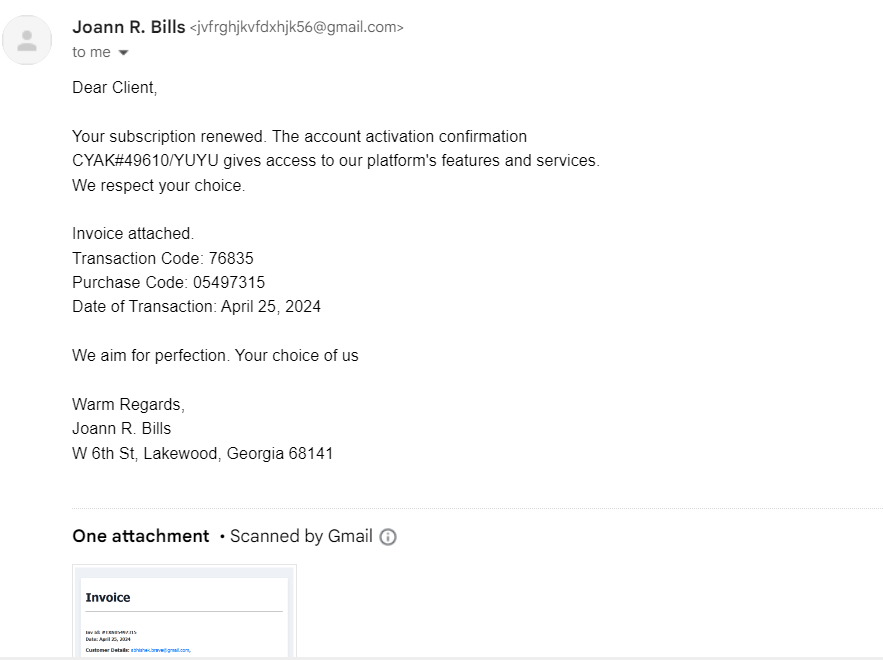
Here’s how I read it.
1. Unexpected content
The email referenced a subscription renewal. I wasn’t expecting one. That mismatch between the email’s claim and my actual reality was the first signal. Any time something arrives demanding action for a transaction you have no memory of, slow down.
2. Generic greeting
It opened with “Dear Client.” Real businesses you actually subscribe to know your name — they have it in their billing record. Generic salutations are a near-universal phishing tell because attackers send the same email to thousands of inboxes.
3. Lack of specific information
The email mentioned a “subscription renewal” but never specified what platform, what service, what product. Genuine renewal confirmations almost always name the product, the plan, and the billing period. Vagueness exists in phishing because the attacker doesn’t know what you’d recognise.
4. The attachment
It included an “invoice” attachment. Attachments are the single most reliable malware delivery mechanism. A real billing notification almost never requires you to open an attached file — the relevant information is in the email body, with a link to your account dashboard for details.
When in doubt: don’t open attachments. Log into the service directly and check there.
5. Manufactured urgency
The email didn’t shout “act now!” but it created a quieter form of urgency: the implication that money had already been charged. That subtle anxiety is the point. It nudges you to react instead of inspecting.
Phishing doesn’t always look like a threat. Sometimes it just looks like a problem you need to resolve quickly.
6. The “From” address
This was the most direct giveaway. The sender address was:
jvfrghjkvfdxhjk56@gmail.com
A jumble of random characters at a free email provider. Legitimate services send from their own domains. They don’t send invoices from anonymous Gmail accounts with keyboard-mash usernames.
The takeaway
No single signal here would have been enough on its own. Gmail’s automated analyser didn’t flag it because the language was clean and the structure was plausible. What identifies a phishing email is the combination — unexpected context plus generic greeting plus vague reference plus suspicious sender.
The skill isn’t pattern-matching on any one tell. It’s noticing when several small things don’t quite add up and giving yourself permission to delete instead of clicking.